Apple Monthly Subscription with 12-Month Commitment
How RevenueCat supports Apple annual subscriptions with monthly commitment terms.


Apple’s Monthly Subscriptions with a 12-Month Commitment bill monthly, but requires the customer to stay active for 12 billing periods. Customers can cancel at any time, but the subscription remains active through the end of the commitment term. If the customer reaches the 13th month, the commitment renews automatically for another 12 months.
These products use the same App Store product ID for two billing plan options:
- 1 Year Upfront: a standard annual subscription with one upfront payment.
- Monthly with 12-Month Commitment: monthly billing with a 12-month commitment.
Overview
- The commitment enforces service for 12 billing periods.
- Customers can cancel anytime, but the subscription stays active until the commitment ends.
- If the customer reaches the 13th month, the subscription continues as another 12-month commitment.
- App Store Connect models both billing plans under the same product ID, while RevenueCat represents them as separate products.
Availability
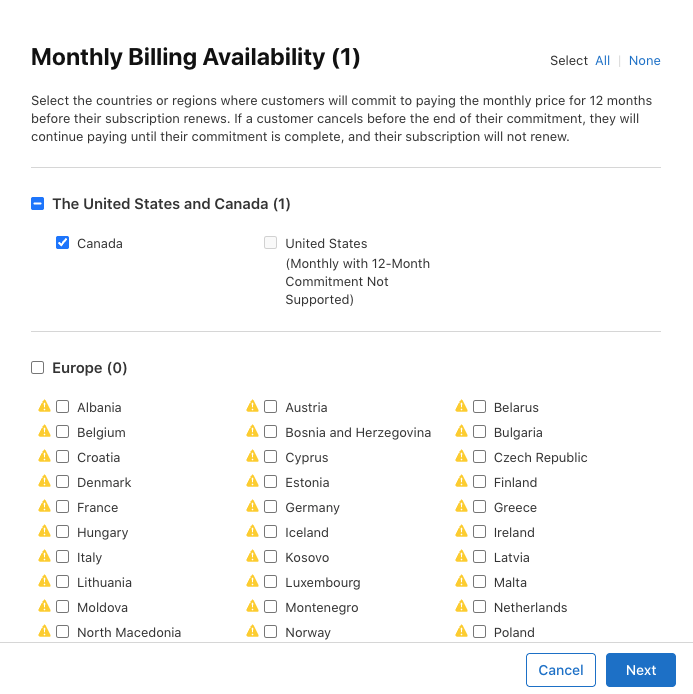
- Available worldwide except for the United States and Singapore.
- Requires building your app with Xcode 26.5+.
- Requires customers to be on iOS 26.4+.
- Requires using the SDK in StoreKit 2 mode.
- Requires one of the following SDK versions:
| SDK | Supported versions |
|---|---|
| iOS | 5.76.0+ |
| React Native | 10.12.2+ |
| Capacitor | 13.7.4+ |
| Flutter | 10.16.0+ |
| Unity | 10.0.0+ |
Product setup
To create your product in the App Store, open App Store Connect and follow these instructions:
- Create the subscription product with an annual duration.
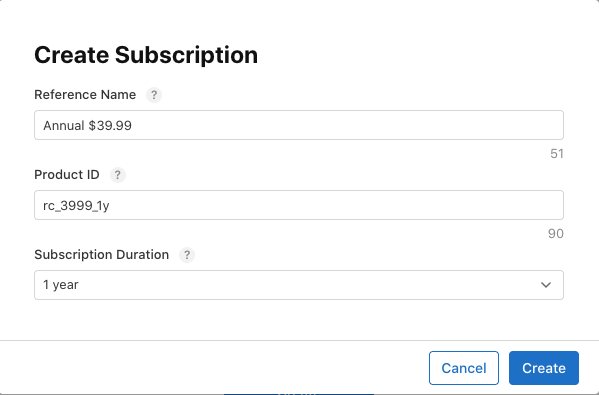
- Add the 1 Year Upfront billing plan first.
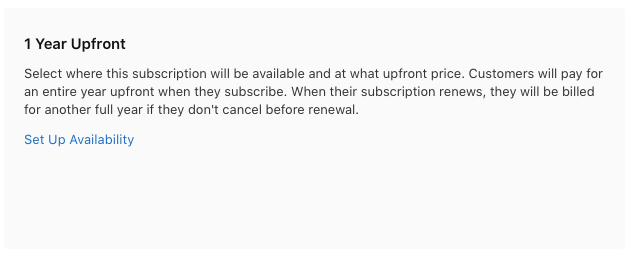
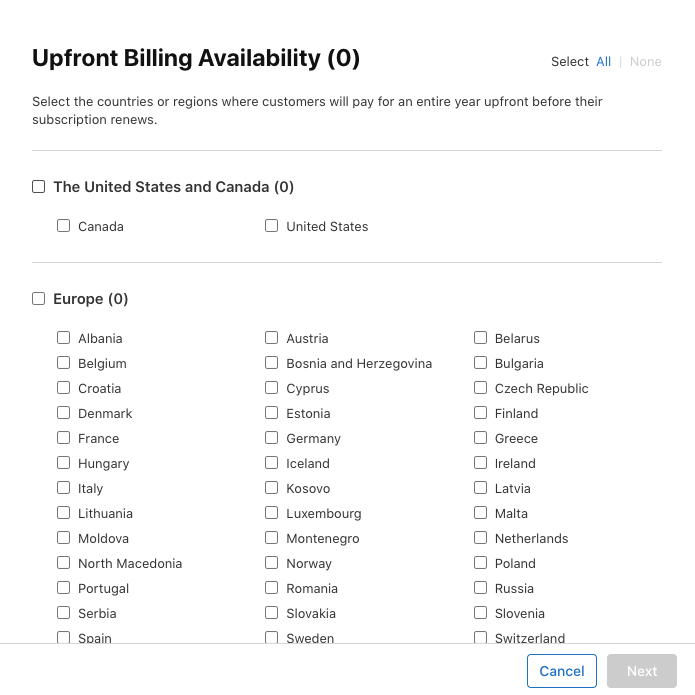
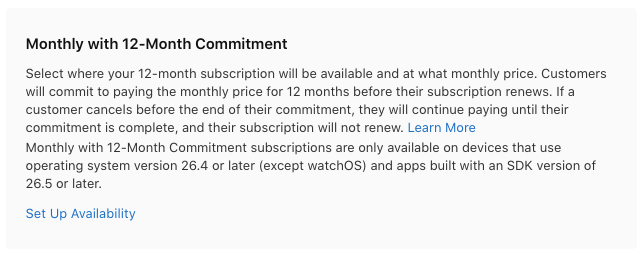
- Add the Monthly with 12-Month Commitment billing plan.
- The monthly billing option is only available in regions where upfront billing is already configured.
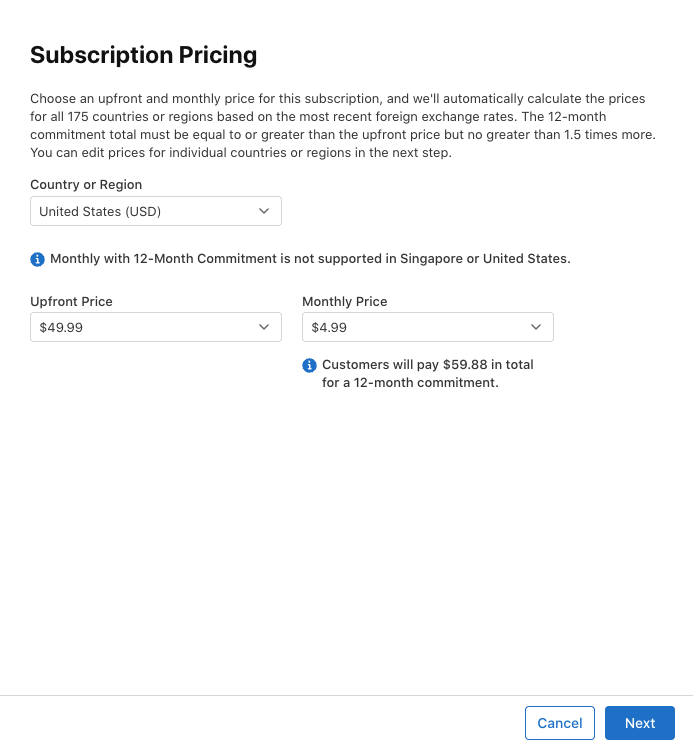
- Set prices for each plan.
- The 12-month commitment total must be at least equal to the upfront price and no more than 1.5× the upfront price.
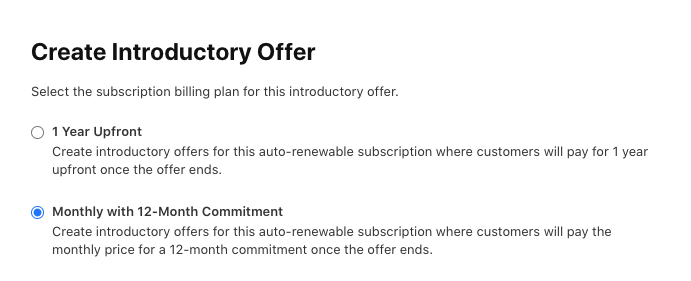
- Optionally attach subscription offers to each billing plan.
- Introductory offers, promotional offers, win-back offers, and offer codes are configured at the billing-plan level.
- Finish the normal subscription product configuration.
How to model this in RevenueCat
In RevenueCat, treat each billing plan as its own product:
- Create the upfront annual product as usual.
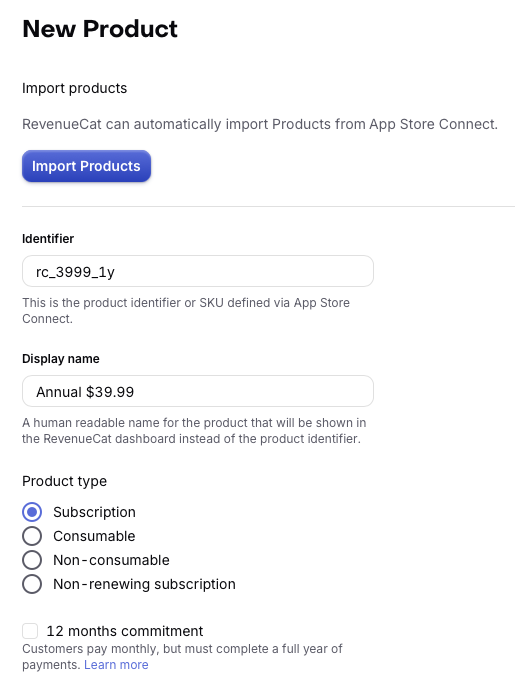
- Create a second RevenueCat product for the monthly commitment plan.
- Enable the 12 months commitment option so RevenueCat knows this product represents the monthly commitment plan.
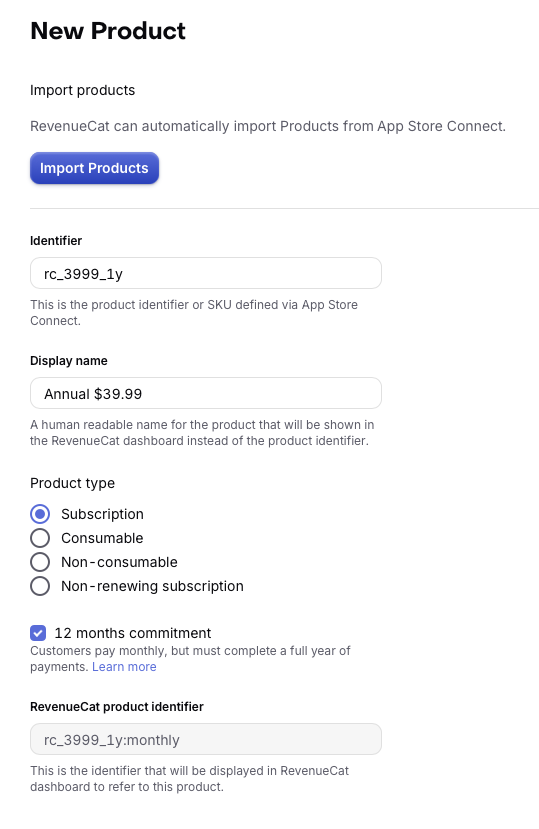
This setup lets RevenueCat track each billing option separately while still mapping them to the same App Store product.
When you create the monthly commitment product in RevenueCat and enable the 12 months commitment option, RevenueCat automatically generates the RevenueCat product ID by appending :monthly to the App Store product ID. That means the monthly commitment product is represented as <apple_product_id>:monthly in RevenueCat.
For API calls, webhooks, SDEs, charts, and other reporting tools, use the colon-form product ID for the monthly commitment product. If you query or filter by product ID, fetch the product using the :monthly suffix so you get the monthly commitment variant rather than the default upfront plan.
Platform product and plan IDs
RevenueCat offerings now expose these products using the same pattern we use for Google:
platform_product_idplatform_plan_id
For monthly commitment products, platform_plan_id is monthly. If the plan ID is null, RevenueCat falls back to the default (upfront) billing option.
API and endpoint behavior
- The
subscribersandentitlementsendpoints expose the same product/plan structure. - Purchases of annual commitment products are processed, mapped to the right RevenueCat products, and unlock the associated entitlements.
- Webhooks, integrations, and public endpoints expose the new product ID format (
<apple_product_id>:monthly) where needed.
SDK
Purchasing a Monthly with 12-Month Commitment product
RevenueCat exposes the monthly commitment plan as a separate product ID using the :monthly suffix. On iOS 26.4 and later you can load it directly. On earlier OS versions, loading this plan may return nil, so you'll need to fallback to purchasing the upfront annual option instead.
RevenueCat Paywalls can sell 12-month commitment products. Because the commitment plan is a separate :monthly product, add it to its own package in an offering and attach that offering to your paywall. See Show monthly commitment details on your paywall for how to display the required prices, and use targeting to show the paywall only to eligible devices.
To purchase a 12-month commitment product on your custom paywall, pass the 12-month commitment package or product to the purchase() function like you would for any other product:
- Swift
- React Native
- Capacitor
- Flutter
- Unity
func purchase(packageToPurchase: Package) async {
    do {
        try await Purchases.shared.purchase(package: packageToPurchase)
    } catch {
        // TODO: Handle error
    }
}
try {
  await Purchases.purchasePackage(packageToPurchase);
} catch (error) {
  // TODO: Handle error
}
try {
  await Purchases.purchasePackage({ aPackage: packageToPurchase });
} catch (error) {
  // TODO: Handle error
}
try {
  await Purchases.purchase(PurchaseParams.package(packageToPurchase));
} catch (error) {
  // TODO: Handle error
}
var purchases = GetComponent<Purchases>();
purchases.PurchasePackage(packageToPurchase, purchaseResult =>
{
    if (purchaseResult.Error != null)
    {
        // TODO: Handle error
    }
});
Show monthly commitment details on your paywall
On a RevenueCat Paywall, there are no dedicated commitment variables yet, but the existing product variables return the right values for a :monthly product:
{{ product.price }}returns the total commitment price, for example $59.88.{{ product.price_per_month }}returns the monthly installment price, for example $4.99.
Apple only offers one commitment term (12 monthly payments), so write the term as plain text in the package. For example:
{{ product.price_per_month }}/month with a 12-month commitment, {{ product.price }} total
Keep in mind:
- The
:monthlyproduct needs its own package in the offering. Don't reuse the package that holds the upfront annual product. - Translate the hardcoded commitment text in each localization your paywall supports.
- The paywall editor preview may not show the real commitment prices. Preview the paywall on a device running iOS 26.4 or later in a supported region to check the values.
On a custom paywall, fetch the :monthly product and read installmentsInfo so you can display the commitment term, total cost, and monthly billing details clearly on your paywall.
- Swift
- React Native
- Capacitor
- Flutter
- Unity
Apple's docs for 12month commitment products state that developers are required to display both the monthly billing price and the total commitment amount to the customer before they initiate a purchase, so be sure to include those values on your paywall. You can retrieve these values from InstallmentsInfo.installmentBillingDisplayPrice and InstallmentsInfo.commitmentTotalDisplayPrice in the iOS SDK. In the hybrid SDKs, use installmentBillingPriceString and commitmentTotalPriceString.
Use targeting for iOS 26.4+ eligibility
Because the monthly commitment plan is only available on iOS 26.4 and later, use RevenueCat's Targeting feature to surface a different paywall for customers who are eligible to purchase it. This helps avoid showing an option that may be unavailable to older devices.
- Show the
:monthlyproduct only to customers whose devices are iOS 26.4+. - Use a fallback paywall for customers on earlier OS versions or devices that cannot load the monthly commitment product.
Managing monthly with 12-month commitments
Upgrade, downgrade, and crossgrade behavior
Apple controls these transitions within the subscription group for commitment plans:
- Upgrade: immediate. The existing commitment ends when the new higher-tier plan activates.
- Downgrade: deferred until the current 12-month commitment finishes.
- Crossgrade: timing depends on the durations and billing plan types of both plans.
RevenueCat follows Apple's subscription group behavior for these transitions.
When attempting to switch billing plans (upfront to monthly or vice versa) via product.purchase(), customers may encounter "You're already subscribed to this" alerts and plan changes may not process. Contact RevenueCat support if you encounter this in production.