iOS 18.3.1-18.5 Canceled State After Successful Purchase



Resolved
Apple has rolled out a fix for this issue, and it should no longer be present in any version of iOS. We are keeping this page for historical reference.
Issue Description
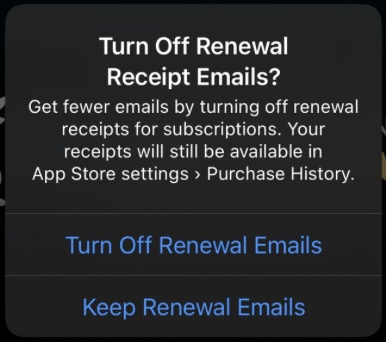
In iOS 18.4 through 18.5, StoreKit (and consequently the RevenueCat SDK) can incorrectly return a canceled state after a successful purchase. This occurs when the user receives a prompt to enable Receipt Renewal emails, which comes directly from StoreKit itself.
Affected Versions
- iOS 18.3.1 (possibly earlier, going back to 18.0)
- iOS 18.3.2
- iOS 18.4
- iOS 18.4.1
- iOS 18.5
- All platforms using StoreKit (iOS, iPadOS, macOS, tvOS, watchOS)
Symptoms
- Purchase appears to complete successfully
- User is charged for the purchase
- Receipt Renewal email prompt appears during or after purchase flow
- StoreKit incorrectly returns a "canceled" state despite successful payment
- RevenueCat SDK reports the purchase as canceled
- The purchase correctly goes through a few seconds later
- RevenueCat SDK reports the successful purchase through the CustomerInfo Delegate
Frequency and Impact
- Occurrence: Only happens once per Apple ID account lifetime
- Trigger: First time a user encounters the Receipt Renewal email prompt
- Status: Fixed by Apple - The fix has been rolled out to all iOS versions
Workaround
Since this issue has been resolved by Apple, the primary recommendation is to implement proper CustomerInfo monitoring to handle any edge cases that might still occur.
Subscribe to CustomerInfo Updates
Monitor CustomerInfo changes to ensure you catch successful purchases even if the initial purchase callback reports an incorrect state:
- Swift
- Kotlin
- Java
- Flutter
- React Native
- Cordova
- Capacitor
- Unity
// Option 1: using PurchasesDelegate:
Purchases.logLevel = .debug
Purchases.configure(withAPIKey: <public_sdk_key>)
Purchases.shared.delegate = self // make sure to set this after calling configure

extension AppDelegate: PurchasesDelegate {
    func purchases(_ purchases: Purchases, receivedUpdated customerInfo: Purchases.CustomerInfo) {
        // handle any changes to customerInfo
    }
}

// Option 2: using Swift Concurrency:
for try await customerInfo in Purchases.shared.customerInfoStream {
    // handle any changes to customerInfo
}
class UpsellActivity : AppCompatActivity(), UpdatedCustomerInfoListener {
  override fun onReceived(customerInfo: CustomerInfo) {
    // handle any changes to customerInfo
  }

  override fun onCreate(savedInstanceState: Bundle?) {
    super.onCreate(savedInstanceState)
    Purchases.sharedInstance.updatedCustomerInfoListener = this
  }
}
public class UpsellActivity extends AppCompatActivity implements UpdatedCustomerInfoListener {
  @Override public void onReceived(CustomerInfo customerInfo) {
    // handle any changes to customerInfo
  }

  @Override public void onCreate(Bundle savedInstanceState) {
    super.onCreate(savedInstanceState);
		Purchases.getSharedInstance().setUpdatedCustomerInfoListener(this);
  }
}
window.addEventListener("onCustomerInfoUpdated", (info) => {
	// handle any changes to customerInfo
});
Purchases.addCustomerInfoUpdateListener((info) => {
	// handle any changes to customerInfo
});
Purchases.addCustomerInfoUpdateListener((info) {
	// handle any changes to customerInfo
});
await Purchases.addCustomerInfoUpdateListener((customerInfo) => {
  // handle any changes to customerInfo
});
public class PurchasesListener : Purchases.UpdatedCustomerInfoListener
{
    public override void CustomerInfoReceived(Purchases.CustomerInfo customerInfo)
    {
        // handle any changes to CustomerInfo
    }
}
Apple Feedback
We've filed a Feedback ticket for this issue with Apple. If you create a Feedback ticket for this issue, please consider mentioning our Feedback ticket, FB16502592, to assist Apple's engineers in connecting the tickets.
Status
✅ Resolved - Apple has fixed this issue and the fix has been deployed to all iOS versions. No further action is required for new app releases.
Best Practices
Even though this specific issue has been resolved, implementing CustomerInfo listeners is still recommended as a best practice for:
- Handling family sharing changes
- Detecting subscription modifications from other devices
- Ensuring your app stays in sync with the latest entitlement status